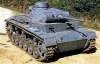




Oztea also has a 1942 setup
https://www.axisandallies.org/forums/topic/20575/oztea-s-1942-global-setup
@SS-GEN Yup, I’m just really busy. I’ll come back eventually!
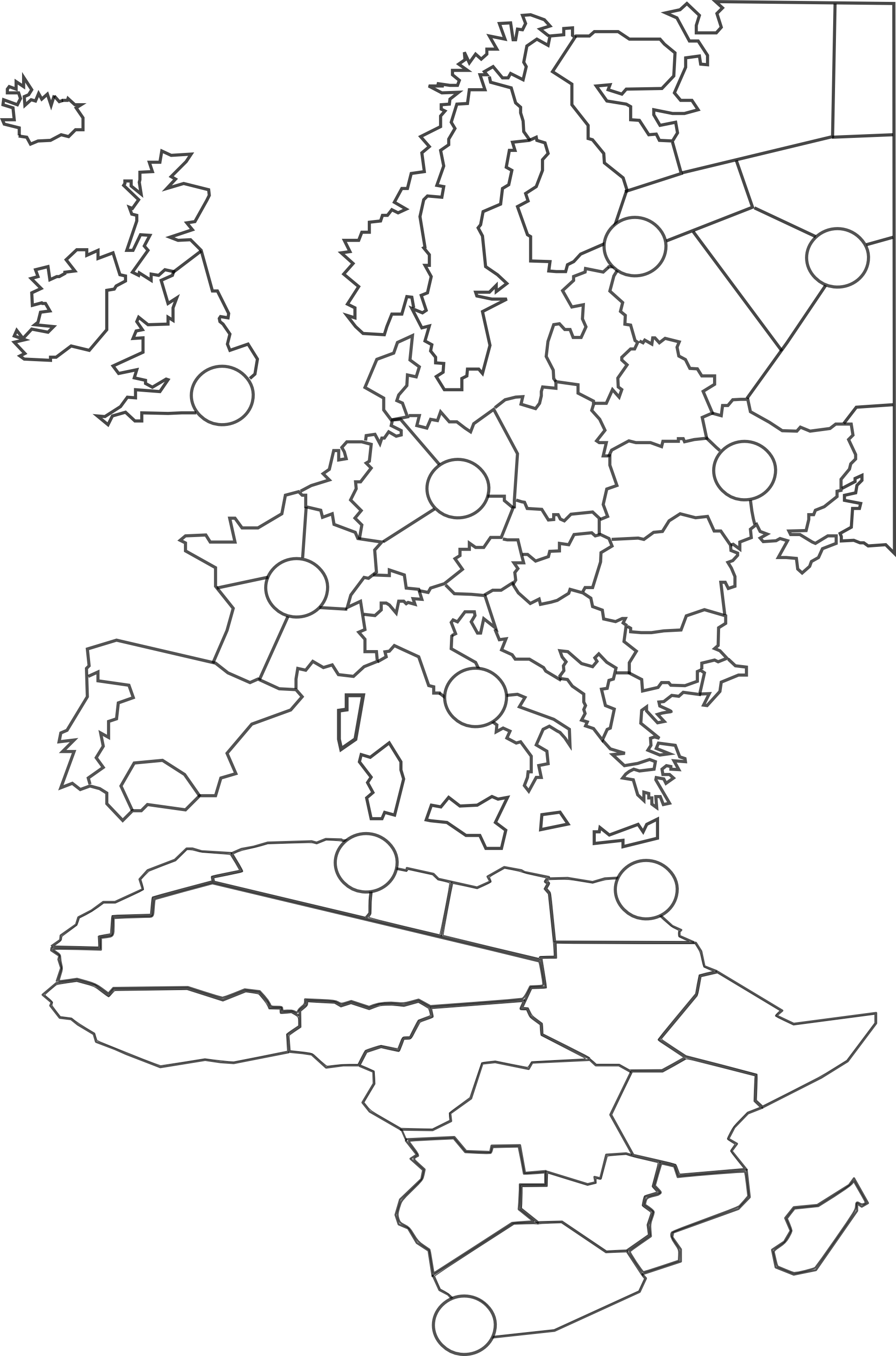
Update: I decided to manually trace a brand new vector map so that I can squash and enlarge continents as I see fit and then rescale when I’m done so that the smallest tiles will still be enough pixels wide to hold a few unit types each. Here’s Europe and Africa – you may notice that Africa is only half the height it ‘should’ be compared to Europe, and that the UK is about 140% of its proper size, and that the English Channel and North Sea are about triple their proper sizes. I plan to continue abusing geography for our wargaming convenience until I’ve finished the whole globe. This project is taking several years longer than I originally anticipated, but I do not plan to quit. Thanks again for all your support. :)
@Argothair said in Argo's Middleweight Map for 1939 & 1942:
This project is taking several years longer than I originally anticipated, but I do not plan to quit.
It’s nice to have a hobby :)
Is it possible to get TripleA to allow transports to move or unload only during noncombat? I was thinking it might be interesting to have two kinds of boats that move land units:
This would make it very challenging to win a beachhead, but very easy to reinforce a beachhead once you’ve got one – you could even follow up the same turn, e.g., landing craft to get from London to Normandy, and then if you actually capture Normandy then maybe transports can unload some tanks into Normandy from Canada or even New York during the non-combat phase of the same turn.
I’d like to find out if this is possible before finishing my sea zones.
@Argothair said in Argo's Middleweight Map for 1939 & 1942:
Is it possible to get TripleA to allow transports to move or unload only during noncombat? I was thinking it might be interesting to have two kinds of boats that move land units:
- Transports, which move 3, carry any 3 land units, and can only unload during noncombat
- Landing Craft, which move 1, carry 1 infantry, bombard at 1, and can load/unload at any time.
Hmm…yea i think you can. You need to use this for the non combat one. It should work, but … ? I can’t remember ever using it so idk for sure :)
<option name=“canNotMoveDuringCombatMove” value=“true”/>
Thanks! I’ll give it a try and let you know. :)
And I bet it does work; I bet that’s the same option that’s used for the AAA guns.
Progress continues. The circles (victory cities) are 180 pixels wide, which means that every territory should have plenty of room to host a reasonable number of units.

I’ve got a reasonably functional prototype in TripleA again with the new map – here’s the unit list:

And here’s a snapshot of the European theater of operations – as you can see, the units are fitting comfortably! This is with map size at 60% and unit size at 100%; players will naturally want to adjust their settings based on monitor size and personal preference.

Lots of work still to do on the XML file – I just managed to get air superiority battles up and running, and next I’ll work on submarine behavior, and then probably head over to canals. It’ll be a while, but I’ll keep at it.
OK, an alpha version of the 1939 map is now available for download! You’ll need to unzip the folder at the link below and put it in C:/Users/[your name]/triplea/downloadedMaps. I’m still working on this, but it’s very much playable (I finished one game with each side), and I’m excited to share. Let me know if you give it a try, or if you have any feedback, or if you want to help with graphics or playtesting – it’s easier to change things now that it would be after it gets more polished.
https://drive.google.com/file/d/1RTTR2kzgPeV82avij5ZI6mXuN5M9ezmi/view?usp=sharing
Hello. Seems like flag images are missing and I got this error message.
IllegalStateException: Error in resource loading. Unable to load expected resource: polygons.txt, the error is that either we did not find the correct path to load. Check the resource loader to make sure the map zip or dir was added. Failing that, the path in this error message should be available relative to the map folder, or relative to the root of the map zip
-Western Russia is too powerful territory it left Germany no option other than breaking it first. I’d want to see the Middle East to be redrawn.
@Navalland Thanks for giving it a try! I’m sorry about the error messages; I’m not sure what’s causing those. I hate to bring up obvious points, but are you sure you’ve unzipped the folder so that the unzipped folder is directly inside your C:/Users/[your name]/triplea/downloadedMaps folder?
You should be able to see the unzipped XML file at:
C:/Users/Navalland/triplea/downloadedMaps/argo/games/argo.xml.
Sometimes if you unzip a folder then Windows will place it at:
C:/Users/Navalland/triplea/downloadedMaps/argo/argo/games/argo.xml, which can cause errors similar to the ones you’re describing.
As far as Western Russia being too powerful, are you saying that just because it is centrally located, or what is it about Western Russia that you feel is powerful? I was surprised to hear that because it is only worth 1 IPC, it starts with zero units in it, and there are paths around it to both the north and the south – you can invade Lithuania -> Leningrad -> Archangel -> Moscow, or you can invade Romania -> South Ukraine -> Caucasus -> Stalingrad. Curious to hear more about your thoughts on that one.
What, specifically, would you like to see redrawn in the Middle East, and why?
Were you able to get the game up and running, or did the error messages crash the game? If you can play the game, do you have any other feedback?
Works now perfecty. First impressions;
-Its better to make combat phrase before than purchasing phrase.
-Considering 1942 borders; Its really good to see Germany becoming almost two times stronger than Russia. I really liked German-Russian-Italian-Chinese income distirbutions. Japan could be slighly more weaker. USA is underpowered and Britain is incredibly overpowered. I t would be not a good idea having significantly stronger Britain than USA.
-I’d call Lorraine instead Maginot.
-You can make Gobi desert Russian territory instead making impassable it would led more strategic options.
-Western Russia’s power lies on blocking everything rather than its income or set-up because its touches everything from Leningrad to Caucasus it means Germany simply cannot bypass it and execute different things like making case Blue or direct approach to Moscow.
-I’d suggest making fewest territory as much as possible in non-combat zones. For example there would be absolutely nothing wrong with making Canada or South America just single territory.
-Middle East is just looks too squeezed.
Good, glad to hear it. And thank you, that’s super-valuable feedback!
I also feel awkward about the income imbalance between UK and US. I agree with you that that’s a problem. I’m not sure how to solve it, and I’m open to advice. My difficulty is that I don’t want fewer territories in, e.g., Australia because I think it would make the combat less interesting, but I also don’t want the average Australian territory to be worth less income, because I want some variation among the territories (they shouldn’t all be worth just $1). Same issue with Canada, India, etc. – it’s not that I consciously decided that Britain should be earning $88, it’s just that I gave them what I thought of as their minimum income for their minimum set of territories for the kind of game I wanted to design, and I was already up that high. There’s a little bit of room to reduce the income of some of the territories in the UK proper – I could make, e.g., West England worth $2 or $3 instead of $4 – but I don’t think it would help enough, and I don’t want the UK proper to be worth less than, e.g., India. Right now the UK proper is earning $20, which only makes it first among equals compared to India, Canada, etc. – if I reduced UK any further, it would be earning less than a commonwealth.
You mentioned that places like Canada or South America are non-combat zones, but I don’t agree – the cruiser can transport commandos all the way from Normandy to Quebec (or vice versa) in one move, and Germany starts with a toehold in Argentina that can grow if the Allies aren’t careful. They’re not usually major combat zones, but the possibility for conflict exists all over the globe, and that’s on purpose.
I could increase the US income, but then the overall Allied income would be too high. I could increase German-Italian-Japanese income to compensate, but then French and Russian income would be too low…you get the idea. So I’m not thrilled with the way that shook out, but I don’t see how to fix it, either.
I like combat move first just fine; I can make that available.
Thanks for explaining about Western Russia. I guess I see Western Russia as being the direct approach to Moscow. The northern strategy is to go Lithuania -> Karelia -> Archangel -> Moscow. The central strategy is to go Belarus -> West Russia -> Central Russia -> Moscow. The southern strategy is to go Kiev -> East Ukraine -> Caucasus -> Volga, which doesn’t get you Moscow, but does get you rich. That said, I suppose there would be room for 1 more territory if I really wanted – the line could be Leningrad-West Russia - East Russia - Caucasus, with East Russia bordering West Russia, Central Russia, Caucasus, East Ukraine, and perhaps Stalingrad. Would that make things better? Why or why not?
I’m not sure I understand what you mean by saying the Middle East looks squeezed. In terms of total number of pixels, its territories are some of the largest in the game – Persia, for example, is almost the same size as all six mainland French territories. Syria is a bit small, but I don’t know how to fix that; I already got rid of Lebanon and Trans-Jordan and Cyprus. It gives the French a presence in the region, which I think adds interest.
Are there any specific changes you would recommend in the Middle East?
Seems like its very hard making Britain weaker than USA with that size without having worthless territories or merging some of them even in WaW USA is almost just as powerful as Britain+Anzac in middle rounds. Its eventually just preference if game works and decently balanced with this income distirbutions its just my personal belive that setting up USA stronger than Britih Empire provides more strategic options for both sides.
Also I think there is nothing wrong with setting up some territories wortless if there are good reasons to fight for them. For example Western Russia and Henan are already very valuable territories due to their locations even if they were wworthless, players would still fight there.
My suggestion about Western Russia would be like this;

With that Germany would gain bypassing Western Russia option by moving South Caucasus-Armenia.
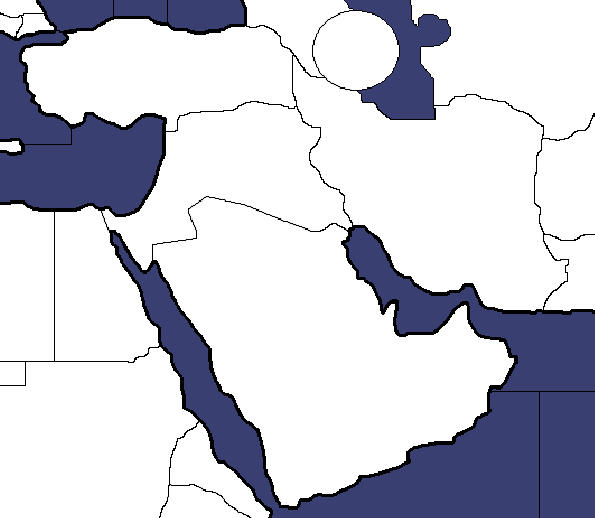
Just I would want to see more realistically proportioned Middle East Especially Persia’s borders.
@Navalland OK, thank you; you’ve convinced me. I’ll split up the Caucasus as you suggest. I’m also going to see if I can create a ‘land canal’ blocking movement from North Caucasus to Volga unless you control Stalingrad (or have a boat on the Caspian Sea and use that). That way players will face a historical choice of whether to attack Stalingrad to penetrate into the somewhat-rich Volga region, or turn south, away from Stalingrad, to soak up the very-rich oil territories (but no victory cities). I may have to tinker with the IPC values a bit, there, too. Maybe 1 for North Caucasus, 5 for South Caucasus, 2 for Armenia, 2 for Stalingrad, and 3 for Volga. That way S. Caucasus + Armenia is worth $7 compared to Stalingrad + Volga’s $5.
If you have specific advice about Persia’s borders, I’ll consider it, but I honestly don’t know what about the Middle East you’re finding unrealistically proportioned right now. I know it’s not perfect, but I don’t see any glaring flaws. Can you point them out for me?
With this size, it would be really better giving Germany case blue option.
For example I tried to simulate it in my map like this;

For the Middle East I can share this example;
The key as always is player options and the balance of this and actual distances between strategic areas. The way to do this is measure the actual miles between major cities/strategic areas and convert this so the spaces on the map do not exceed the ratio’s.
Example: 500 miles =1 space will be designated on map
Distance from Kiev to Moscow= say 653 miles
So the area designated as Kiev will be 1-2 spaces away, depending on other pathways to capital with consideration to actual terrain as well.
Also, the template on the total number of land areas is directly influencing the length of how the game takes to finish. You want to finish in a day or a weekend? Too many areas will take that long to cover and G40 is the longest playtime you would want so what im looking at is a two week game!
Navalland, your maps are interesting, and if you put them into TripleA then I’d be happy to help you playtest them – we could scratch each other’s backs here.
That said, I really need you to be more specific about your suggestions for my map if you want your comments to be useful. You know what’s going on in your head; I don’t. You can’t just say “give Germany a case blue option.” You have to specify what kinds of attacks you want Germany to be able to make, from where, and when, and why, and how – otherwise your comment isn’t anything I can act on. I feel like pretty much every comment you make, I have to ask you to explain it in more detail, sometimes more than once. I’m getting a little frustrated with that. Please try to add in more details as you make each suggestion. The images help a little, but I also need you to say with words what it is that you’d like me to do and how I can do that.
@Imperious-Leader Yes, that’s one of the design goals here – how can we create the maximum number of strategic options with the minimum number of territories? That’s part of why I just have “Western Russia” instead of Kursk and Smolensk and Bryansk, or why I just have “Siberia” instead of the five Siberian territories from Global, or why I just have one territory for Guyana instead of splitting up Suriname and Guyana and British Guyana. It’s always a challenge to cut territories, though – as my conversation with Navalland indicates, every time you simplify something, someone will object that now the map is missing a feature that’s important to them.