


You might have more success when you ask for that on this forum:
https://forums.triplea-game.org/
Good luck :-)
bolded text
Hey flipper
should be in your triplea folder
@flipper @barnee
In case you are on Windows and have not changed the target directory in the “Engine Preferences” you find your savegames here:
C:\Users\<Username>\triplea\savedGames
Just delete the *.tsvg files you don’t need any longer.
This is how to find out the target directory on any OS:
Enter the “Engine Preferences”:
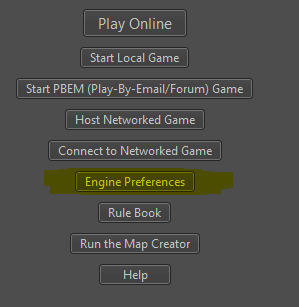
and find the “Folders” section:

There you will see the path to your savegames.
(Mine is different because I have manually changed it.)
@Panther having some confusion navigating here on the new forum but thank you for the reply’s…
Managed to finally figure it out
@flipper You are welcome. :smiley:
In case you struggle with the navigation: You can always easily access your latest postings by visiting your own profile (klick on your username). At the bottom of the page you will find your latest postings, then.