




@Panther Following your advice I logged out from Google and reset my Eqqman (on that forum) password and was then able to log in with posting privileges. Thanks!
Changes to the next version of TripleA to consider…
-
#1). How do I change the colors of the map?
#2). How do I change where the units are placed?
Thanks in advance!
-
unzip your map, then move the zip file somewhere else or delete it
colors of map territories are in the “map.properties” file
colors of units are whatever unit image is in the /units/nation-name folder. use any paint program to change the hue to the desired color.
unit placements are located in the “place.txt” file. you can change these using the triplea map maker utility. to run the map maker utility, open triplea and then select “engine preferences” then click “map maker”
in the map maker, read the stuff first then move to section 2 and select the “placements” option (manual, not automatic), then load the existing placements using the load menu option. after loading them, you can change them then save it.all of this is in the help documents that come with triplea, btw
-
Thanks!
-
Some things for you to consider. Make the units different colors. For instance, the Germans, Brits, Anzac and US units are very similar in color. A suggestion would be, make them darker and different colors. Like, make the US units a dark green, instead of light green. Make the Japanese units red, like in the old Pacific game, so you can make the UK units yellow. Change the German units to black. And Anzac to a neon teal or something like that. Just a suggestion. As a first time TripleA player, it is difficult sometimes to distinguish the units from one another.
I find that they look nothing alike. I don’t understand how you think they look so similar.
-
I guess you don’t understand then.
-
Well, I guess if you suffer from a form of color blindness, then yeah.
-
No, not color blind. Just my perspective. Not sure why you felt the necessity to comment on my post when I wasn’t even making the suggestion to you. My recommendation is, you don’t comment on my posts in the future and I’ll extend you the same courtesy.
-
Odd, I don’t see the reason to badger Brado over something that is of little consequence to anyone but him.
I mean, I don’t have any problem distinguishing between most team colours, but since the solution would only affect his personal version then it feels like a non-issue for anyone else.
BTW, Brado if you go to the triple A development forum there is also a thread there where you can download the master file folder of pretty much every unit ever designed. This includes sub folders of all the units in almost every colour you could imagine. Wouldn’t be much of a task to switch them into whatever map you enjoy playing and double checking that they are labelled correctly to the originals.
Finally, you may want to check what you have set. Increasing the unit magnification might allow you to see the current colours better also.
Cheers, Happy gaming.
-
Thanks Hepps! I’ve found that by decreasing the size of the units to 100%, instead of 125% helps a lot. Also, disabling the Show Map Details feature helps a lot also. Makes the background of the territories better. I’m getting used to distinguishing the units better also. It just was a transition going from the Battlemap app to TripleA.
One question, since the Japanse territories are yellow and the number, showing the quantity of units is white. Is there a way to display to number, showing the quantity of units as black, instead of white? The black would show a better contrast against the yellow Japanese territories. Thanks!
-
One question, since the Japanse territories are yellow and the number, showing the quantity of units is white. Is there a way to display to number, showing the quantity of units as black, instead of white? The black would show a better contrast against the yellow Japanese territories. Thanks!
This feature will be included in the next version:
The unit count numbers can be customized in the next version of triplea.
-
Thanks Panther!
-
I find it difficult to distinguish cruisers from battleships myself
-
Me too…
-
Personally I redrew battleships to distinguish them more from cruisers.
There are also 2 different images for cruisers. The less used one is often far more distinguishable, especially if you find the normal one too similar.
-
So how does one switch to the other cruiser?
Also now that i look at it again german subs and destroyers about look the same :P
-
Here are some examples of how unit images can be redone to help make everything more distinguishable.
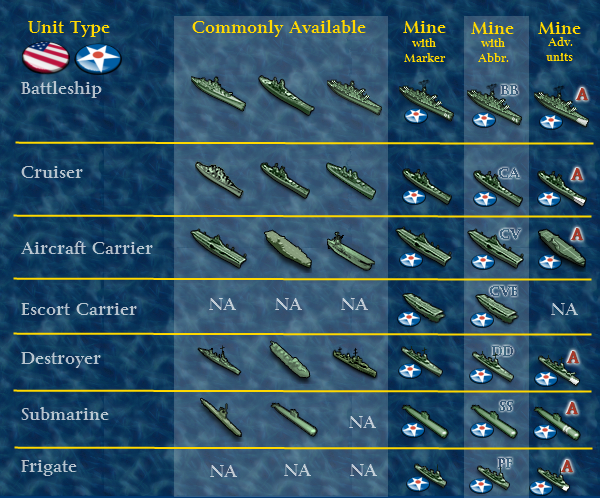
But if you are trying to do it yourself then you can go to the Triple A development forum and find the thread that has the entire repository of unit images (more or less) made for Triple A.
Once you have that file you can simply open the map folder for your favorite game then open the unit folder and go into each team and replace any units you feel you’d like to see different.
Important!!! Any units you replace must have the identical name of the original. If the name is not the same as it was then your game will crash every time Triple A tries to draw the image for that unit.
-
Take a copy of the image you like and save it somewhere on your computer.
Go into your Triple A. You can either change it for one game or you can change it for all the games.
If you want to change it for one particlar game you can replace the image in the “units” folder inside the Map folder.
If you want to change the image for all games then you can go into the “assets” folder in triple A and go into the “Units” folder.
It all depends on whether the game you are playing has its own “unit” folder or not. If a game has its own unit folder then the unit images have to be changed in that. If the game has no units folder it will draw images from the Triple A unit folder.
The changing of unit images is also dependent on how the games you have, have been installed. If all your games are still zipped then there may be other steps involved.
-
everything in a map’s folder, except for the XML file (in the “games” folder) can be changed WITHOUT affecting your games
it is all client side stuff, meaning you can change out your pictures and unit art and it won’t affect your game or your opponent or your opponent’s computer, in any way
so have at it
-
Ahh OK thanks I know how to change the icons now. I did it for Global 1940 this way:
- unzip the World War II Global file in c:/users/YOURNAME/trimple/maps
- change the names of the icons in c:/users/YORNAME/triplea/maps/WorldWar II Global/units/Americans
- did this for all the powers
I found that changing “cruiser” to “cruiser_x” and the “battlecruiser” to “cruiser” worked great. Thanks!
-
It would be cool if the new version included the LH sanctioned 1942 setup:
http://www.axisandallies.org/forums/index.php?topic=30910.0
(Yes, I’m too lazy to adjust everything manually, but it would also be necessary to adjust the turn order.)
In any event, thanks Veqryn for all the work so far!
Suggested Topics