


Looking back. I probably should’ve selected Discourse as the forum engine. The deployment strategy, at the time, was more complex than I wanted. I had a grudge against Ruby on Rails projects (kinda still do). But the UI was clean. I bet the API is cleaner and less breaking. Making another change might cause more churn though.
Where is the Search Button
-
I can’t find it since last update
-
@barnee
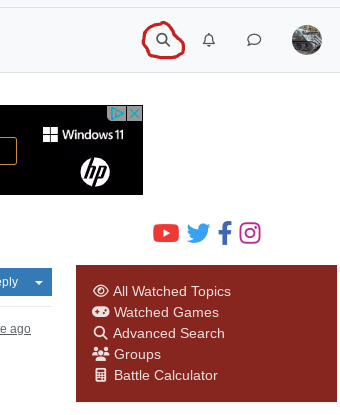
Perhaps I haven’t got the update yet, but it is still next to the notification bell and user icon on the top right of the screen.Hope this helped!
-
-
@barnee Wow, that’s certainly different! Some ideas I have is clicking the user icon or the menu icon. I don’t have it yet, so I cant help too much yet.
(Also, this new menu in the screenshot looks weird)
-
yea I tried my icon and settings but didn’t see anything. Maybe it’s a linux issue :)
I think the powers that be are trying to obsolete it. The linux :)
-
@barnee said in Where is the Search Button:
I can’t find it since last update
The last update was in Oct. 2023. ( https://www.axisandallies.org/forums/topic/40248/nodebb-upgrade-to-3-4-3-complete )
Have you tried a different Skin in the Settings? That might help…
Which browser are you using? Have you installed any extensions?Also clearing the cache / a hard browser reset / reload might help the browser to render the site correctly.
Your screenshot reminds me of how the site looks on mobiles. Strange …
-
@Panther said in Where is the Search Button:
The last update was in Oct. 2023.
I thought there was one more recent than that. Like 6 months ago. Anyway, I will try your suggestions. Thank you.
Edit
I’m using Brave if that’s the browser. -
@barnee said in Where is the Search Button:
I thought there was one more recent than that. Like 6 months ago.
No, we are still on 3.4.3.
Good luck!
-
@barnee said in Where is the Search Button:
I’m using Brave if that’s the browser.
I see Brave comes with adblockers, VPN and other possibly interfering stuff. Maybe that is a reason?
Have you tried with a plain Chrome or another Chromium based one or Firefox? -
No I haven’t. firefox quit working with node. I’ll try it again. I was on brave before and it worked. Maybe one of their updates did something
-
@barnee The width of your browser window is too narrow. Try increasing the width and se if they return.
Once you get below a certain width the arrangement of the web page changes. The buttons on the left of the header get rolled into a menu icon in the top left. The buttons on the top right (as far as I can tell) just disappear.


-
@barnee Correction the ‘chat’ and ‘notification’ buttons display if you click on the profile picture. Try using CTRL + F, seems to use the web page search rather than the one for the browser.
-
yea it shows up with fire fox. Must be a microsoft issue.

I tried lowering shields on brave but didn’t work. Musta been some trekkie who came up with that :)
Yea the ctrl f thing showed up and i could type into it but I couldn’t get it to engage by hitting enter. More star trek lol
-
@barnee It’s what @FlyingBadger pointed out. However, I think it’s a slight variation.
I think you zoomed in on the page. In Chrome on MacOS, I do this by hitting Cmd-+ to zoom in or Cmd-- to zoom out. I know this because my eyes are just not what they used to be (but still pretty good, not complaining, yet) so I’ll occasionally zoom my browser or code editor, etc. If you zoom in too much, it’s the same as having your window too small.
-
@djensen ahh yes that was the problem. It shows up now. TY :)
Suggested Topics