


This address, that you chose, is better:
So topic closed here.
This seems to be more or less the same way as we do it on the game board.
All units in each Army, Army Corps and Army Group are placed at the Army Boards next to the game board.
And it needs a lot of attention, when for example two Army Groups etc. are fighting against eachother.
And - as in TripleA - we use the Combat Board to display all units during the Combat phase.


@The-Captain :grin:
@barnee that’s a lot of Panzers :)
Seems complicated. Very nice though!
This Example will Explain How U-boats work.
This is now out of date as of 2-13-24. It will be updated in the near future. Latest DL explains in Game Notes.

It is Reccommended to Roll All Wolfpack Battles in Edit Mode Using the Intended Rules
Currently they work like this:
“Wolfpack” units are A0 D0 C0 units with unlimited movement. They give 1 AA shot of +1 on offense and +2 on defense to each U-Boat in it’s sea zone for 1 round only. Any hits will not be able to fire back, regardless of enemy Destroyers being present.
You may place Wolfpack units in any sea zone next to German controlled territories. Use edit if needed to place elsewhere. Place them in the First place phase so they can be used that turn. They have unlimited movement but will still be blocked by Destroyers, so use “Perform Move Or Other Actions” in edit if needed. Otherwise, you must place before starting your combat move.
Do not take as casualties. They will auto die if they are the only units left. They still need to be hit though, so if you get tired of rolling, simply submerge Wolfpack and he will auto die at End of Turn.
After combat, triplea will remove any Wolfpack units that are in the Atlantic Ocean or Mediterranean Sea that no longer meet the requirement for a Wolfpack, before the Germans non combat move. You will need to use edit to remove any additional Wolfpacks before Germany’s next combat move, if enemy attacks have done the same.
@VictoryFirst and I have determined that it is Best to use Edit and be completely rule compliant. If you don’t want to use Edit, then it will play with the above rules.
The Kriegsmarine Buys 3 U-boats and since they will all be placed in same Sea Zone, a Wolfpack as well.

U-boats in 103, 108 and 117 SZs, are going to Attack the British DD and Trprt in 106 and Form a Wolfpack.


We go to Edit Mode and add a Wolfpack to 106.

NOTE
If this were to be the Only Battle this turn, you would need to edit the Wolfpack at the Start of Combat Move or you will not be able to add it before Battle, as the Battle will start immediately during the Combat phase.
Also, you will need to have Edit on at the End of CM, so you can Fight the Battle in Edit.
If you forget, let the Battle play out and then use Dicebot and edit the results or you can redo your turn as long as you keep it the same.
If multiple Battles, then place at the Start of CM.
The Battle
Ignore the first set of Dice as they are the “AA Shot” triplea uses for Non Edit play.

So Hit OK or Space bar, since no casualties have been selected. That is the default while in Edit.

The next set of Dice are the U-boats normal First Round attack. Remember U-boats Attack at 3 for the First rd.

Select the correct amount of casualties. Also, the Trprt has to be selected last, so the DD is sunk.

The DD doesn’t go down without a Fight and sinks a U-boat.

The Wolfpack has now Disolved, so we sink it too.

We then continue the Battle or since this is a Defenseless Trprt, we can submerge and sink it with Edit at the start of NCM.
EDIT
Actually, since you are already fighting the battle in Edit, simply kill the Trprt when it’s the last unit left. So, in the above, the 1 U-boat hit and you would sink them both.

We then continue our turn and when we are ready to Place, we place all U-boats and Wolfpack in 112 SZ.
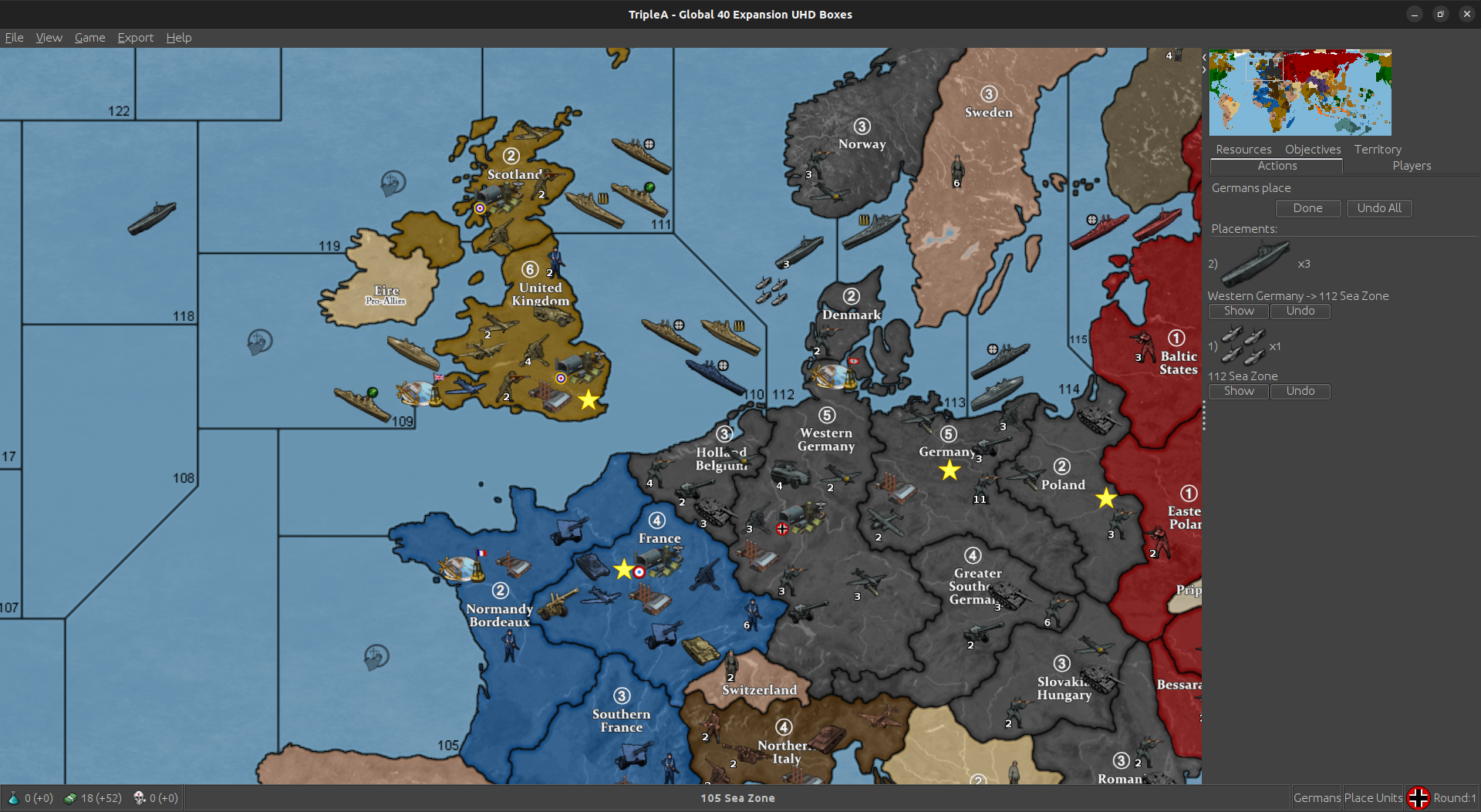
In Naval Battles that have Vessels other than just U-boats, especially Large Battles, you may want to Fight the 1st Rd with Dicebot,
Do your Combat Move. Then do 1st rd of any Wolfpack Battles in Dicebot. Undo your CM and edit casualties. Then continue with your normal CM.
Any Units that have moved from the same originating TTy, will have to have there moves undone in order to use edit to remove units that started there as well.
If possible and not too mind blowing, try and move all units from the TTy that will be sending U-boats to the Wolfpack Attack in one CM or Moves. That way you only need to undo that move or moves, if attacking from more than one TTy, and not the ones that are attacking a different zone.
If you start the Battle in Edit, you will have to Fight All of it in Edit.
Defense
When Defending, they basically work the same way. It is Important to remember that if they have no DD present with them, any Enemy Subs that hit that are with a DD, will sink them with there First Strike Shot and they will be unable to Fire back.
Do your Combat Move. Then do 1st rd of any Wolfpack Battles in Dicebot. Undo your CM and edit casualties. Then continue with your normal CM.
Any Units that have moved from the same originating TTy, will have to have there moves undone in order to use edit to remove units that started there as well.
If you start the Battle in Edit, you will have to Fight All of it in Edit.
Anyway, that’s basically how they work. Sometimes you will need to Edit to remove Wolfpacks as well. If it’s at the End of Germany’s turn, they should auto remove, but they don’t always.
If after an Allied turn, you will need to Edit.
Remember, it’s up to you to select the correct amount of casualties while in Edit the same as if you were playing on the physical board.
U-Boat Rules page 41
https://drive.google.com/file/d/1SRDOsOwlO4Aa13cULwkWrorrXEmCmiN-/view
This will show an Example of “Army Groups” in Battle.

When Attacking a Territory that has an Army Group, you must move the Defenders Units From the Boxes First"
Turn on Edit and go to “Perform Move or Other Actions”.

Go to the appropriate Boxes and move the Units to the Defending TTy. In our Example, AG Center is Defending in Berlin. It consists of 1st and 2nd Panzer with 1st and 2nd Waffen as well as 2 Waffen INF who are unattached making up the required 10 Land Units.
Since the AG is Defending in Berlin, Both of it’s Armies are Active. In this case that means Both Panzer Armies.


“Panzer_General3” is what Activates the Panzer Army. Since both Panzer Armies are Active, we have 2 of them.
Now move the Attacking Units.
Note Once you are in “Perform Move or Other Actions” you can keep moving Units from different TTys without having to click on it every time the way you do with “Add Units”.
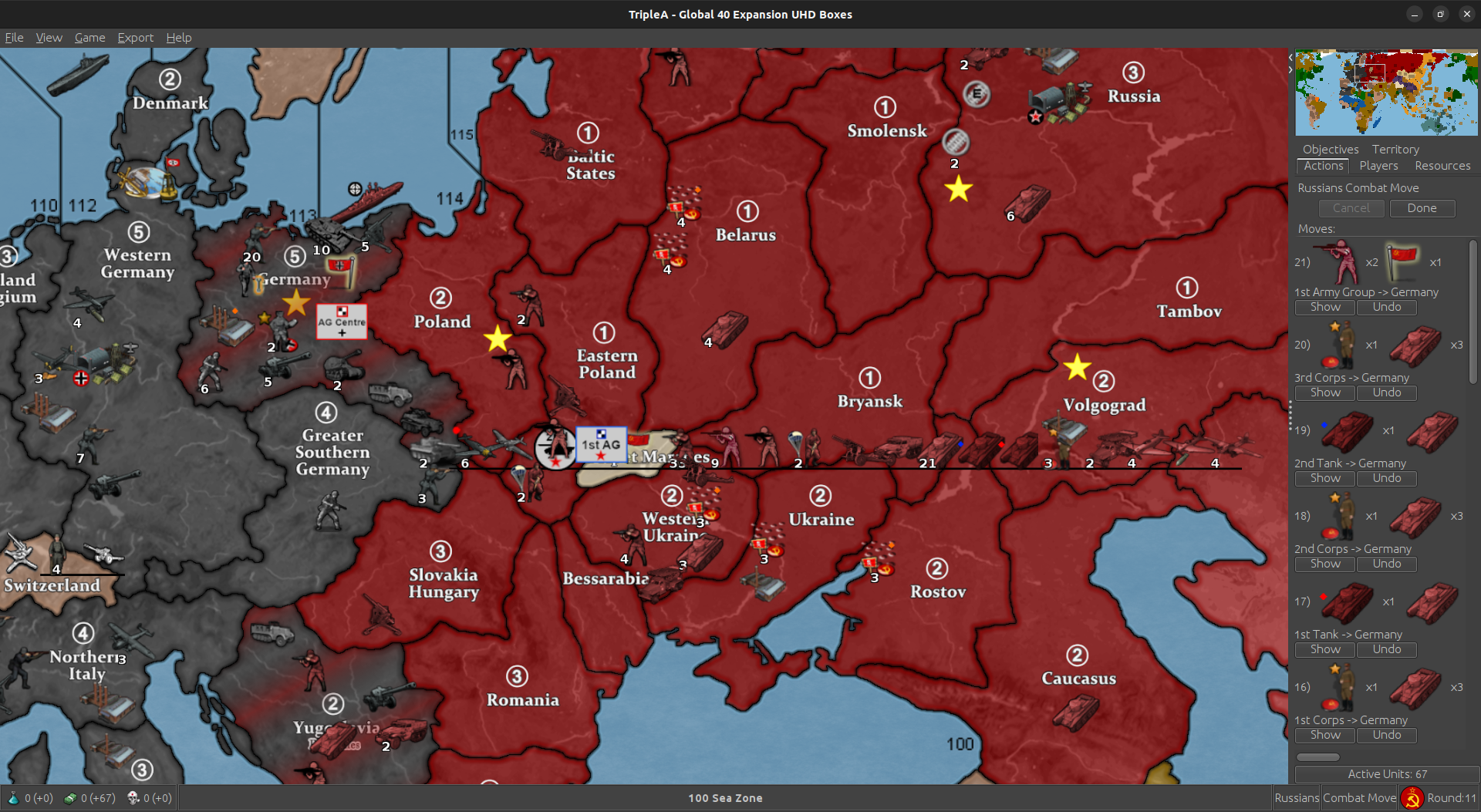
It’s Important to remember the Makeup of the AGs, so you will know when to Deactivate them in Battle. Once Battle is joined, you won’t be able to access history, so a separate window containing a screenshot or simply jot it down on paper etc … as long as you remember :)
In our example, 1st AG is comprised of 1st Tank and 1st Corps with 2nd and 3rd Corps plus 2 Guard INF for the required 10 Land Units.

2nd Tank is also attacking, but he is Inactive, thus they are being led by a “Tank General” instead of a “Tank General3”.
When using the Battle Calculator, you need to remove any non Hit Point Units for a more accurate result.
In this case that would be both AG symbols and 2nd Tank.
Also, if you were Attacking a TTy without a Defending AG, you need to edit a “Inactive” AG Flag in case it is needed as a HP to even out the Attackers Flag.
Do Not take as casualty until After the Attackers Flag has been killed. If the Attacker’s Flag survives it will auto die at end of battle.
I will pause here so the post doesn’t time out
All Right ! On to Battle !
It’s important to communicate with your opponent the correct order of loss before starting.
I think some triplea players know how to do it by round but I do not. You can’t save mid battle but you can take a screenshot. Maybe they try to be online at the same time Idk :)
At any rate, our Battle, while large, is still rather straight forward. Both players want to keep there AGs alive for as long as possible, although if the Battle gets skewed, that could change.
Hence, once again, why you want a clear line of communication with your opponent.
Ok here we go :)
Only 1 AA hit. Bummer for Jerry.
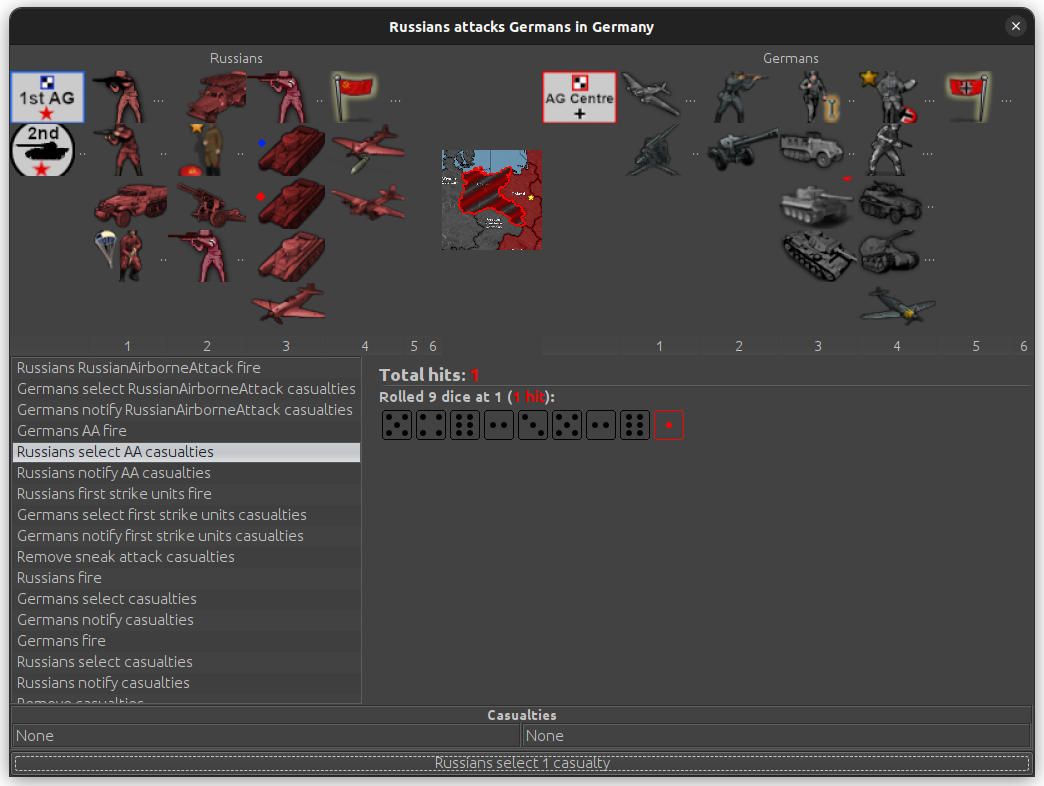
31 hits for ivan. Slightly above average. His “2s” did pretty good.

We can’t take the AG symbol as a casualty, so we dust the Engineer instead. The AG is still intact.


Jerry delivers a Massive blow to ivan as his counterattack is well above average.

They are able to keep 1st AG intact though. The Battle continues :)
Pretty close to average for the commies. Tick above maybe.


Unfortunately for the reich, AG Center is disbanded as well as 2nd Panzer. If they had taken 1 less hit, they could have killed there FTRs to keep 2nd Pnzr intact.
Both Active Armies in the AG keep there Active status as long as they are complete. It does not matter if the AG is disbanded.
It’s not to be though. Let’s see if they can get one more big lick in against the russians.
Looks about average. Same number of hits as ivan.


1st AG is disbanded but 1st Tank remains active. This should do it.
The Reich is Defeated. They put up strong resistance till the end.
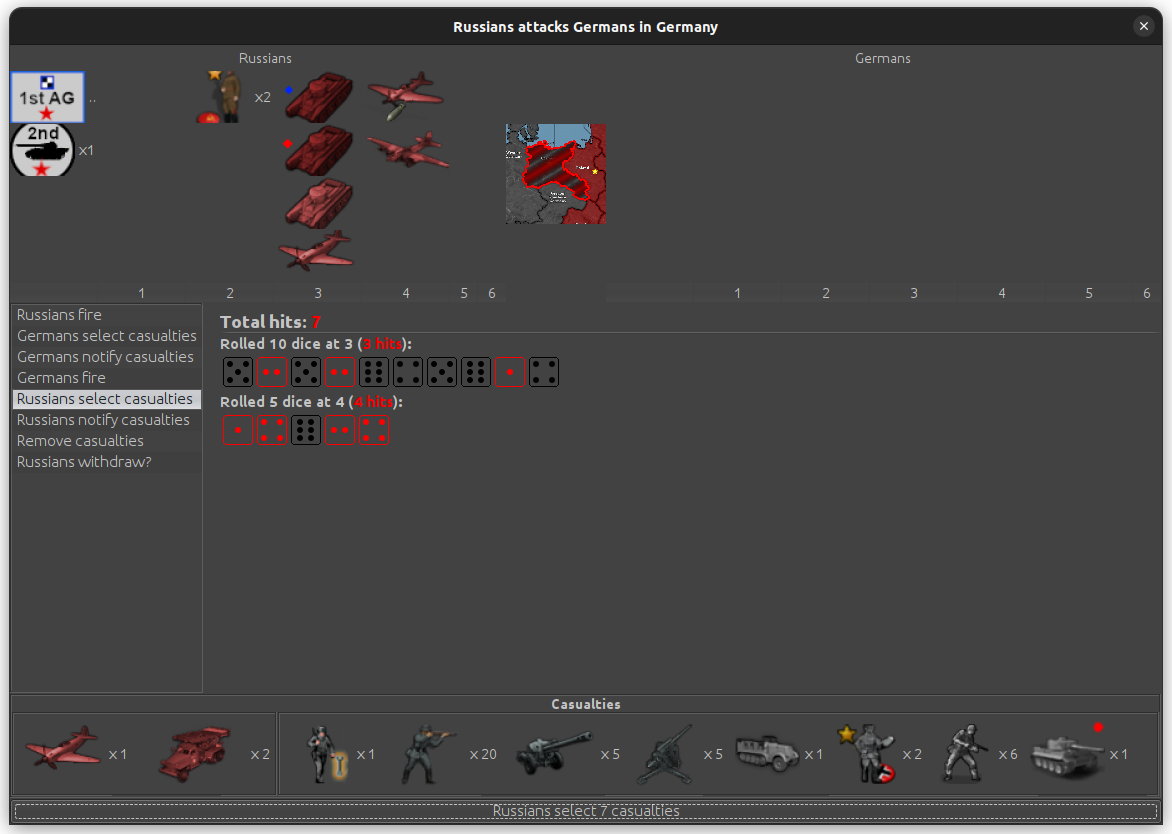

We’ll break before Non Combat Move. :)
It was a close Fight. Not a lot of russians left.

Tank General 3 is Edited to Tank General. This is done first, as if we move Units in Edit from the same TTy before editing him, it doesn’t work.

1st AG and 2nd Tank move back to there Boxes.

The rest of the now defunct 1st AG move to there Boxes as well.

2 Paras move from Eastern Poland to Germany. As this is Non Combat Move and the russians have conquered Berlin, they are able to use there Air movement ability.
They aren’t allowed to on an Attack of a Capital.

The 2 Paras and one of the TGs reform 1st Corps with the surviving commiesar.

It says “Tank units” in the rulebook can be in a Corps, so I’m gonna assume that means TGs too. I will ask @The-Captain for clarification when I’m done here, just to make sure.
EDIT
The above is incorrect. Tank Generals can not be part of a Corps
I will make a Note for that in the Game Notes.

An Elite also moves in from Poland, but they are not allowed to be in a Corps.
russia finishes the rest of there moves and places there units.

I will provide additional examples in the future concerning the use of Boxes.
Just because it looks Cool lol
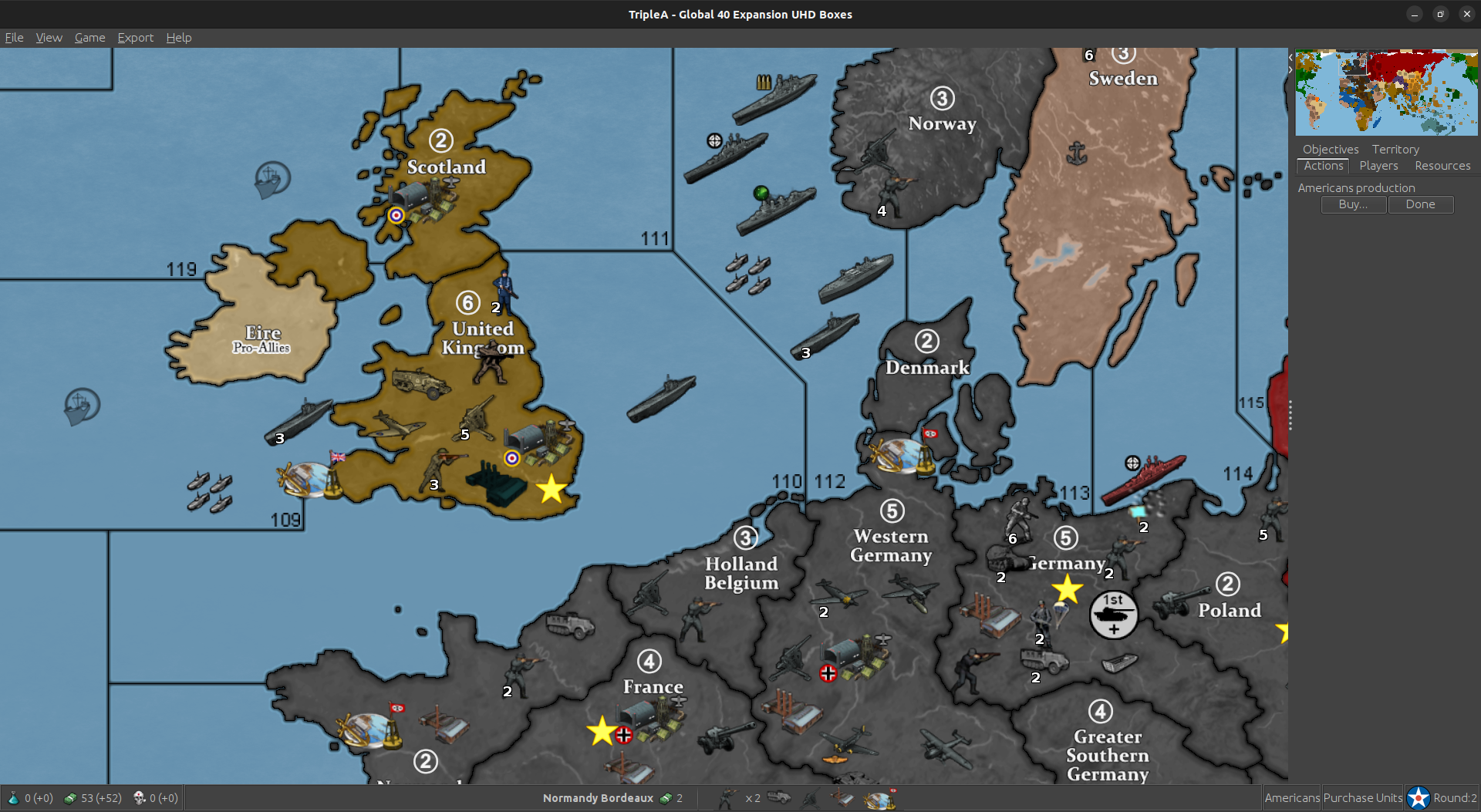
Combat Engineers have been updated. Had to make a new Unit.

For Combat Use “German_EngineerAttack” Russian etc…
You will need to Edit before Combat replacing it’s counterpart. It will only conduct Combat Operations of “Blitz with Tank” and A2 when paired with Artillery.
This is only needed for Attacking. The othe Engineers will defend correctly as well as the “Attack” Engineer. Use Edit to replace as needed.
Here is Latest Update:
Update to 1.875
Change Log UHD Boxes:
Version 1.875
12/20/23
Change “aaGun” Transport Cost to Same as “Armour”.
Made German Air Transport the only one that can Carry Tank Units.
Allow Germany to Build Total War Units in Italy.
Add “Luftwaffe” and “Fighter Aces”.
Escorts and Convoys Now Auto Change in Most Situations.
DL Instructions https://www.axisandallies.org/forums/topic/39844/global-40-expansion-boxes?page=1
DL link, always same, https://github.com/beelee1/global_40_expansion_uhd_boxes
Here’s the new Fighter Aces


Update to 1.876
Change Log UHD Boxes:
Version 1.876
12/21/23
Add “Fighter Aces” to the Timetable.
DL Instructions https://www.axisandallies.org/forums/topic/39844/global-40-expansion-boxes?page=1
DL link, always same, https://github.com/beelee1/global_40_expansion_uhd_boxes
Landmines
Updated on 2-24-26


Landmines require a fair amount of edit. As with most things they become easier to use the more experience you acquire.
In games I have played, Russia and Germany use them the most, so we’ll use them for the example.
In Early 1940, the Soviet Union is concerned with possible German expansion at their expense. They begin to build Landmines to counter the threat.
They purchase 7 Unarmed Landmines called “mine_unarmed”

as well as a “Combat Engineer” called “Russian_Engineer”.


They will deploy in Moscow during the 2nd Place Phase right before the Collect Income Phase.

In Late 1940 the Soviets will move them in a multitude of ways and begin to Arm them against specific Land Borders.
It is suggested to read the “HouseRulesExpansion” rulebook for detailed information on their movement. Page 28
https://drive.google.com/file/d/1jI_1JdIC-1KiTihBICJAbtX3GpVYnNgf/view
As you can tell, triplea does not allow the movement of LMs in CombatMove ( CM ). This is rule compliant.
The Soviets will move 1 LM to Bryansk using it’s natural movement capacity of 1. It will also use the “Combat Engineer” ( Engnr ) to move 3 LMs to Belarus.
To do so, you click on the “Engnr” and then the 3 LMs.

then move them to Belarus

this requires no use of the edit function. They will also use “Strategic Rail Movement” explained on page 37
https://drive.google.com/file/d/1jI_1JdIC-1KiTihBICJAbtX3GpVYnNgf/view
to move 3 LMs via “Rail” to the Caucasus. To do so, it works similar to the Engnr. Click on the “Rail” icon and then 1 LM. Then move to the Caucasus.

You may also click on all 3 Rail Icons and LMs at once and move them together if going to the same destination.
Note that triplea will currently allow 1 Rail unit to move two other units instead of just 1. It is “PlayerEnforced” ( PE ) to only move 1 unit per Rail.
Anyway, the SSR ( Soviet Union ) is using all of their Rail movement to send 3 LMs to the Caucasus. SSR has now completed their NonCombatMove ( NCM ) and will go to their 2nd Place Phase. This is when the LMs will be Armed.

Once they have made it to there final destination and are ready to be “Armed”, you will need to replace them via Edit with “Changer” LMs.
Which ones will depend on which Border you want to defend. High use areas have Border specific LMs. This means when you hover on the LM it will tell you which Border you are defending.
Current ones are listed in the triplea in game “Game Notes” which are listed under the “Help” tab top left.


As a guide
No color denotes West
Blue North
Red South
Yellow East
Green NW and SE
Orange SW and NE
Use the Comment Log which is located on the top left under “View” to clarify which border is being defended if no specific LM is available.
To Arm
Go to Edit Mode and select “Add Units”

Go to the Territory ( TTy ) that have the unarmed mines that you want to Arm. In this case “Belarus” . Select “Changer” and then, if you read the in Game “Game Notes” you will know there are Border specific ones for Belarus, you look for the one you want.

If you forget just look through “Changer’s” edit window if you think it’s in a high use area.
Anyway, the SSR is going to Arm the 3 Belarus LMs at Eastern Poland ( E POL ) and Changer has those specific mines. So select 3 “Belarus_EPOL”

Boom they’re on the map.

Now click on the 3 unarmed mines while still in edit mode and hit “Remove Selected Units”.

We now have 3 LMs in Belarus defending at E POL. Since they are Border specific we can hover on them and see which Border they defend.

These Border specific LMs are for informational purposes only, so it’s OK to use a generic one and record it in the “Comment Log” top left under “View” if you can’t find it.

We also Arm the 3 LMs in Caucasus at the Black Sea “100 Sea Zone”.
We have to scroll down a little bit to find them.

It takes a while but after a few games you’ll start to figure out where they are located in the changer edit window. One important note though is, for some reason, if you add changer LMs and you want to add the same type of LM in a later turn, it’s place in the edit window will have moved to the left.
Here is Belarus_EPOL the next time adding them.

Anyway, when in doubt, just use a Generic Changer LM and document in the Comment Log.
You have to use Changer Mines once they’re Armed though. Otherwise undetonated LMs will create a battle. Changer is Allied to everyone and will thus prevent that.
How They Defend
Do your Entire Combat Move.
At the beginning of the Battle or the end of CM, roll for any Landmines that have been crossed. If there were any LM hits, go to Edit and remove the appropriate units and LMs.
Then, turn Edit off and fight the battle normally.
You may use the in game dice roller under “Game” next to View or use the A&A.org dicebot.
Here Germany is attacking Belarus from East Poland with 3 Infantry and 1 Artillery. SSR defends with 1 Infantry and 3 LMs.
We hover on the LMs and see which border they are defending.

We will use the in game Dice Roller and roll for the 3 LMs.


One unlucky German Infantry steps on one and is blown up.
The Wehrmacht is also attacking Baltic STs, so we don’t need to activate edit before we go to Battle Phase. If only one battle, then we would need to activate edit now, as triplea will immediately start the battle.
Start of battle turn on Edit and remove 1 LM and 1 Inf.

Turn edit off and then fight the battle.
Do not take mines as casualties in combat. Player enforced.
The Wehrmacht prevails. Note that the remaining LMs do not make the Territory contested because those LMs are controlled by “Changer” who is Allied to all Players.

Any time in the future that the Belarus E POL border is crossed in either direction the LMs will need to be rolled for.
Exception
Retreating attacking units do not roll for LMs. It is assumed they know a safe path through after just crossing it, as well as for game play balance so LMs are not overpowered.
When a territory is conquered, all the unarmed mines will be destroyed. Armed Changer mines will be unaffected.
Use the same procedure as above, for any units that cross the minefield in non combat move.
Mines will block blitz movement. Use edit “Perform Move or Other Actions” to make a legal move.
Very nice work!
The Soviet Fighter Ace Leads a successful sortie

A MAJOR improvement to how Landmines work is in the works.
Thanks to a Brilliant suggestion by @Panzerstahl-Helm you will be able to “Hover” on the LM and it will tell you which TTY it’s defending.

You will still have to fight the LM battle in edit though :)
Edit
Might be able to make Country specific LM A0 D0 with a First Strike that hits at 2 or less. That way the LM hits wouldn’t be able to fire back.
Would still have to edit to changer if overrun.
Hmm … not sure if A0 D0 units can do that though. The First Strike.
Well, will test that lol

Update to 1.9
Change Log UHD Boxes:
Version 1.9
1/28/24
Fix SZ 122 Border.
Change Fighter Ace Cost to 11.
DL Instructions https://www.axisandallies.org/forums/topic/39844/global-40-expansion-boxes?page=1
DL link, always same, https://github.com/beelee1/global_40_expansion_uhd_boxes
Edit
Am going to quit posting here https://www.axisandallies.org/forums/topic/39844/global-40-expansion-boxes
Not sure how we ended up with two threads, but all future updates for triplea G 40 Expansion will be here :)
Update to 1.91
Change Log UHD Boxes:
Version 1.91
2/13/24
Adjust German Boxes.
Add Alternate Landmines.
Remove First Strike for Paratroopers, U-boats and Type XXI U-boats. Remove A1D3 Desert Generals and Commisar.
Fix Underground Factories Not Changing Correctly.
Update Take Over of Italy Notes.
Add Kamikaze Option.
Add FlackTower Option.
DL Instructions https://www.axisandallies.org/forums/topic/36998/global-1940-and-1943-expansion-for-use-with-triplea?page=1
DL link, always same, https://github.com/beelee1/global_40_expansion_uhd_boxes
Big Thanks to ebbe at the triplea site for the FlackTower image !


Update to 1.92
Change Log UHD Boxes:
Version 1.92
2/14/24
Adjust FlakTower so it Does Not Count as a Placement.
DL Instructions https://www.axisandallies.org/forums/topic/36998/global-1940-and-1943-expansion-for-use-with-triplea?page=1
DL link, always same, https://github.com/beelee1/global_40_expansion_uhd_boxes
Update to 1.93
Change Log UHD Boxes:
Version 1.93
2/16/24
Change some Placements in the Med and N Africa.
Move Tech Notification to French RD 6.
DL Instructions https://www.axisandallies.org/forums/topic/36998/global-1940-and-1943-expansion-for-use-with-triplea?page=1
DL link, always same, https://github.com/beelee1/global_40_expansion_uhd_boxes
Have been making landmine play more difficult than needed.
After your Combat Move, but before combat, do the landmine rolls and then you can edit the hits without redoing anything at start of Combat phase as long as there is more than one battle.
Otherwise, triplea will go straight to battle and you can’t edit.
Same for large Naval battles with Wolfpacks.
Notes will be updated next update to clarify this.